
Structured Prompt Inputs
Choose an element type, set the tone, and describe the situation so the output feels specific instead of generic.
Prompt setup
Button Copy
Element typeButton
ToneFriendly
ContextCheckout CTA
Output3 options
Generate short, polished UI text for buttons, errors, tooltips, onboarding, and more. QuickCopy AI gives product teams three ready-to-use microcopy options based on your context and tone.
Built for product teams that care about clarity, tone, and better UX writing across every screen.
Everything in the product is centered around generating, refining, copying, and revisiting interface-ready microcopy.
Choose an element type, set the tone, and describe the situation so the output feels specific instead of generic.
Generate three short suggestions at a time so you can compare phrasing, clarity, and voice before choosing the final line.
Every successful generation is stored so you can revisit earlier prompts, compare outputs, and copy old ideas back into your workflow.
QuickCopy AI helps teams move from vague placeholder text to interface copy that sounds intentional, clear, and ready to ship.
Designed for the people who regularly shape product experiences through small but high-impact pieces of interface text.
Short microcopy options generated for every prompt.
UI element types supported across common product flows.
Tone presets to match product voice and brand style.
On-demand copy ideation whenever your team needs it.
The workflow is intentionally simple so you can go from idea to usable microcopy without extra setup.
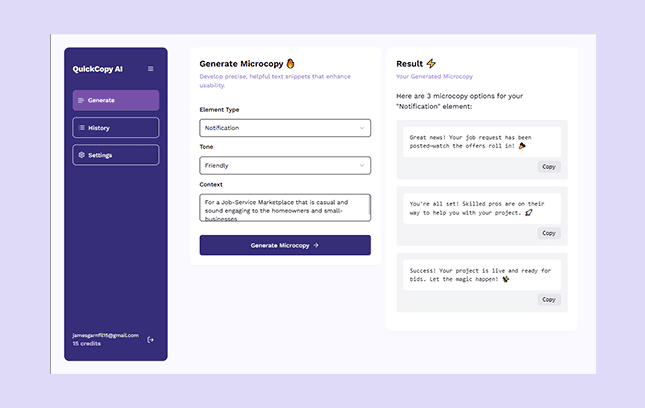
Choose what you are writing for, from buttons and tooltips to onboarding messages and notifications.
Add the product situation, audience, or screen state so the generated copy feels relevant and specific.
Review three suggestions, copy the best one, and revisit saved history whenever you want earlier ideas back.
QuickCopy AI fits best wherever teams need short, reusable interface copy that sounds polished without slowing down shipping.
We move from rough placeholder text to launch-ready UI copy in a few minutes.
QuickCopy AI helps us explore multiple tones before we commit to final interface text.
It is the fastest way to polish buttons, errors, and onboarding prompts without overthinking every word.